UX Project: Queue-less Dining Experience @ RP
A detailed process of the research, analysis & end-product of the project
Design stages: Empathize & Define
Goals: Understanding our target audience through observation & interviews/ defining the problems we would like to address
Customer Journey Map
Before beginning our on-site research, we created a journey map of the typical journey a student would take when purchasing food from the canteen during lunch time.
Field Study
Our research was primarily conducted at 2 of RP's canteens, South Canteen & Nanyang Cafe, which are both located closest to our block. We observed the environment of the location and the length of the queues. A major revelation during this study was the tendency for queues from differing stalls to clash and sometimes morph into one, creating confusion as users might mistakenly join the wrong queue.
'How Might We' Statements
Seeing as this was a group project, each of us were tasked with forming 2 HMW statements each. Our statements focused on varying issues that were noticed at the canteens, from the payment process to locating a seat.
Interviewing the Target Audience
Each of us interviewed a student from Republic Polytechnic to gain more insights into the challenges they face and the improvements that can be made. Here is a summary of the information we gathered:
Where do you usually go to have your lunch? Why did you choose that food court?
- Users frequent a variety of canteens and restaurants at RP, depending on their food preferences or presumssuigably their budget.
What are your experiences when queuing for food?
- Most interviewees did not report a entirely negative experience from queueing for food as they took measures to prevent this, such as by switching to a stall with a shorter queue, avoiding peak hours or using their phone while waiting. Most users are content with their experience as they are able to complete their meal in time, with some appreciating the way the staff organize themselves to create an increasingly efficient process.
Have you ever skipped your meals because of long queues?
- Majority of the interviewees have not skipped a meal due to long queues. However, if the situation does occur, it happens very rarely.
What are some concerns you would have if you were to use a mobile ordering app?
- Running out of battery, complicated interface, lack of customization options and excluding images of the food are some concerns that users are concerned of.
If we were to make an app for mobile ordering, what feature do you think would help you best with your queuing experience?
- Amount of people in the queue, issuing a queue number, pre-ordering feature, estimated waiting time, the amount of orders being processed and updates on the status of the order preparation are some features users are interested in.
Is there anything else you would like to voice out regarding your concerns about queuing/ordering food in school?
- Majority of interviewees did not have any more concerns, although 1 did mention that the issue with queues clashing should be improved.
Persona
We created 2 personas of students with similar concerns regarding the issues that we noticed and heard from the interviewees.
Empathy Maps
The empathy maps we produced for each of the personas provided us with an understanding of the possible emotions and thoughts that users might face and havedue to the issues we had identified.
View the full slides:
Design stage: Ideate
Goal: Brainstorming suitable ideas to reduce congestion and waiting times
Brainstorming
A total 10 ideas were brainstormed for our group, each of them providing the students of RP with efficient and informative tools to plan their lunch breaks accordingly. The ideas are as follows:
- An app with a pre-ordering feature that allows users to order beforehand and check the estimated time to completion.
- Digital kiosks situated around the canteen for users to order their meals through self-service.
- Dedicated pickup shelves for digital orders only. Visual screens show order status to inform students on when to collect their food.
- An app that shows the best time to buy food based on analytics of peak hours and canteen crowding conditions.
- A smart table system, each table has a bult-in QR Code on the table for users to scan and order their food online.
- An app for users to reserve their seats beforehand.
Dot-Picking
After labelling our ideas, we conducted a dot-voting session to identify which solution we believed to be the most suitable and appropriate for the students and vendors at RP. Ultimately, majority of us chose a smart table system with a built in QR code as the most suitable. Personally, I find this extremely effective to skip the queue as it does not require users to pre-emptively download an app for pre-ordering, providing access to the website's features for the wider RP community.
View the full slides here:
Design stage: Prototype
Goal: Sketching and producing a high-fidelity prototype of our chosen ideas
Sketch 1
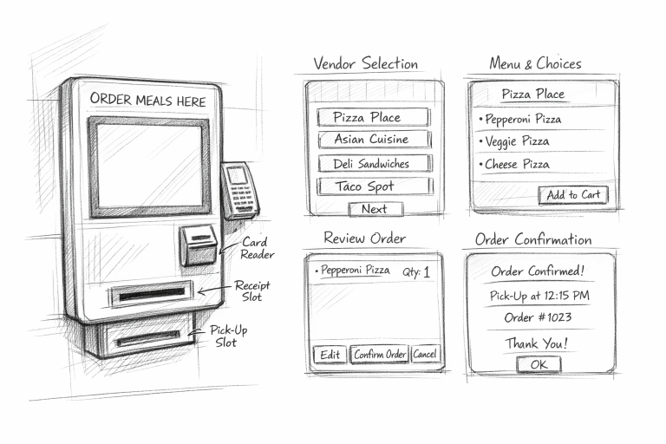
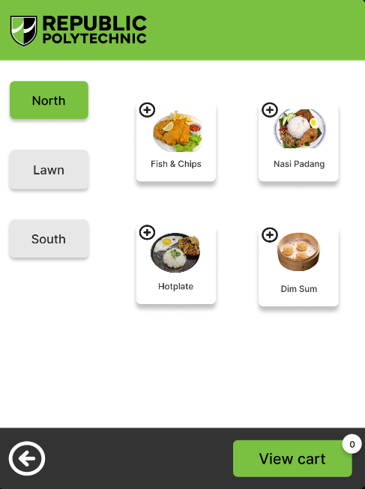
My first sketch was for a self-service all-mounted kiosk which will be placed at each level of every block to provide students and staff with an option to pre-order their meals if they are keen on skipping the queue. This kiosk features a ticket dispenser where students will receive a copy with their order number and estimated time to completion. Sketch produced using ChatGPT
Sketch 2
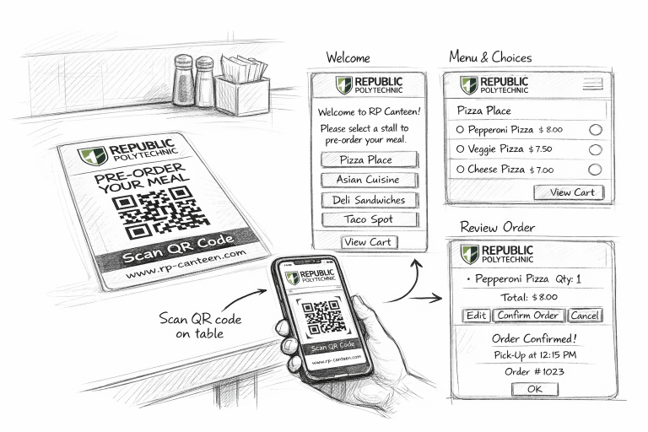
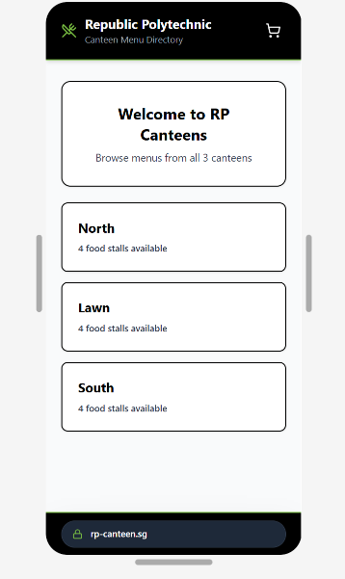
My second sketch was for tables with QR codes to pre-order meals. The tables at the 3 canteens will feature a QR code for students and staff to scan. They will then be redirected to a website featuring the stalls at each canteen. After placing an order, they will receive a ticket number and estimated time to completion through their phones. Sketch produced using ChatGPT
Sketch 3
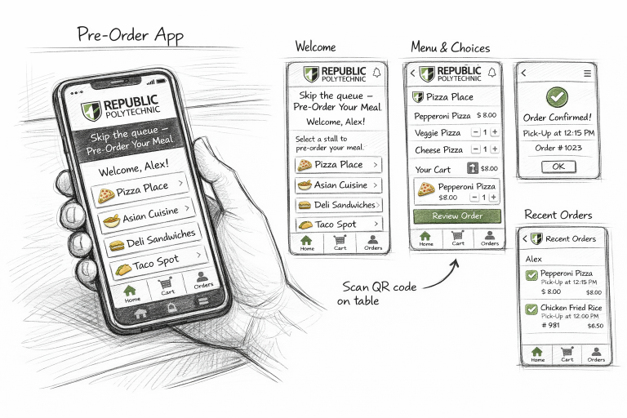
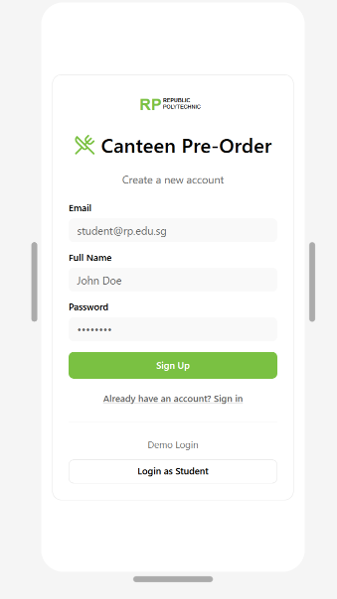
My third and final sketch was for an app which will include login features for students and staff to register if they are keen on being regular users. This app can possibly also provide incentives and discounts for those that do sign up. Furthermore, this app also features a pre-order and estimated time to completion features. Sketch produced using ChatGPT:
Storyboard of Finalized Idea
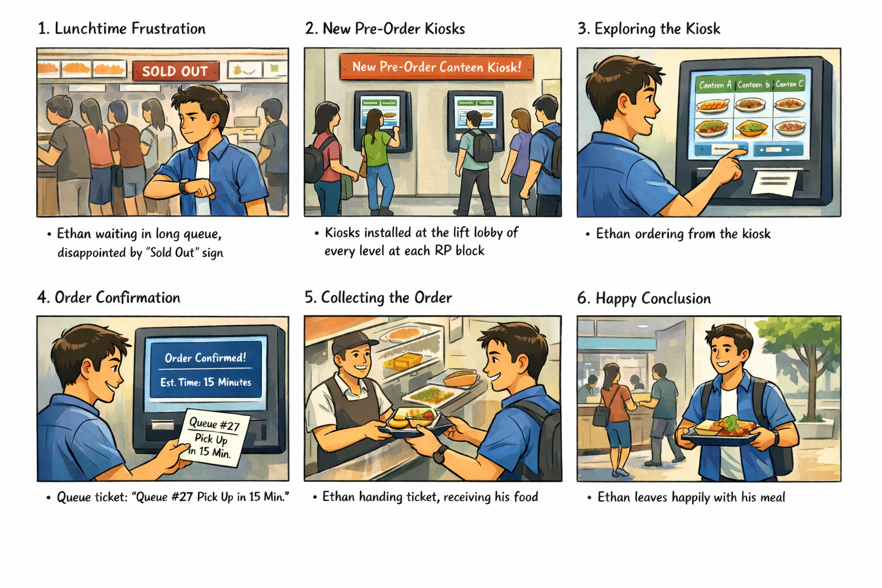
After completing the sketches, I settled on my first illustration, which was the wall-mounted kiosks at every block. I created a storyboard using ChatGPT to present a scenario where the kiosk comes into to play and creates an effective solution to skip the queue.
View the live sites
Design stage: Testing
Goal: Testing the prototypes with the target audience to have first-hand feedback on pain-points and possible improvements.
Conducting the Testing
My 2 testers were tasked with interacting with each site from Figma and ranking them based on whichever they believed were the best fit for the 3 categories in the Excel sheet. To provide a summarized review of my sites. tester 1st felt that the app was the most exciting to use as it includes reviews and ratings of each stall, providing users with additional information to make the best decision for their meal. The app also informs users of the amount of people in the queue. The 2nd tester felt that the website from scanning the QR code was the best as it is easier to view the images on the website as they are bigger. The tester also appreciated the queue number feature, estimated time to completion, order details and the instructions on how to collect the food.
Project management
Goal: Providing information on the status of the project for the stakeholders.
Project Plan
A detailed plan of the tasks and their respective assignees at each stage of the design phase. Additionally, it also informs stakeholders of the duration and status of each task, ensuring that they remain up-to-date about the project's latest progress. Project Plan updated as of January 2026. View the project plan on Excel:
Gantt Chart
The Gantt Chart conveys the same information in a more visual manner, by providing stakeholders with a bar ranging from the start and end date of the task, allowing them to view and understand the length of each tasks clearer. Gantt Chart updated as of January 2026*
Risks & Contingencies Plans
Risk: Changes in laws and regulations related to data privacy, security, or accessibility that could possibly affect the team’s prototype during and after production.
- Contingency Plan: Remain consistently updated with the everchanging rules and guidelines of the Infocom Media Development Authority(IMDA). Ensure that the design has been thoroughly reviewed with the relative professionals to ensure that there are no oversights in the product. Conduct user testing to further eliminate any difficulties or pain points in the product.
Risk: Performance and usability concerns may arise if designers stray too far from the mainstream design standards and disregard the needs and frustrations of the target users.
- Contingency Plan: Abide by the design standards that have been identified and constantly used in recent times. Regularly refer back to the information that has been collected during research to ensure that the user’s feedback and needs are kept in mind. Conduct user testing after prototyping to gather insights on what can be improved and if there are any shortcomings in the design.
Risk: Scope creep and requirement changes may occur if stakeholders make last-minute changes and alteration to the requirements that have been agreed upon beforehand.
- Contingency Plan: Ensure that the project team and stakeholders are kept on the same page throughout the design process, regular meetings with stakeholders should also be held to ensure that the clients are kept updated and involved every step of the way. Decide upon the requirements before the design process begins to minimize changes and alterations at any given point of the project duration.